How Do I Edit The Name Of A Heading?

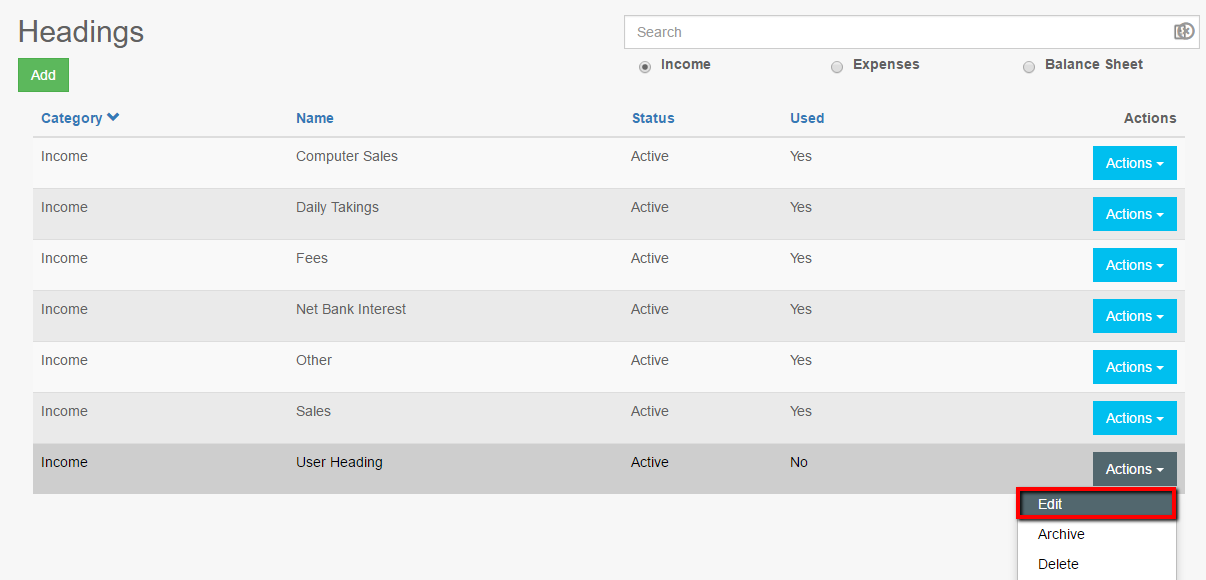
- Select the heading type to be amended; Income, Expenses, or Balance Sheet.
- Click Edit against the user created heading to be amended. System headings cannot be changed.
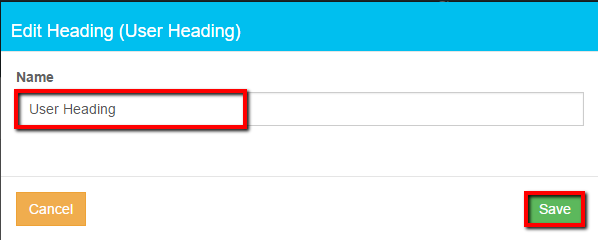
- Edit the contents of the Name box
- Click Save changes
Related Articles
How Do I Add A New Expenses Heading?
Click Settings Click Headings Select the Expenses radio button Click Add Enter the new heading name in the box and click Save. Note: Use + to quick add a heading on Create supplier invoice and Record expenses
How Do I Add A New Income Heading?
Click Settings Click Headings Select Income Click Add Heading Enter a heading in the Name box Click Save Notes: A quick add heading is available in Record income and Create invoice, initially Headings added this way appear at the bottom of the list
How Do I Add a Section K Income Heading?
Click Income Click Record Income Click the + icon on the heading line Select either Investment or the Life & Pension category. Only headings in these 2 categories are included in Section K. Type the Name of the heading you wish to add in the box - ...
How Do I Add A New Balance Sheet Heading?
Click Settings Click Headings Select Balance Sheet Click Add Select a Category from the drop down list Enter a heading in the Name box Indicate VAT treatment click Save
How Do I Edit An Adjustment?
Click Accounting Click List Adjustments Select the period the adjustment applies to (Closed or Current) Click the Pencil icon to edit the adjustment Click Save when done
