How Do I Add A New Balance Sheet Heading?


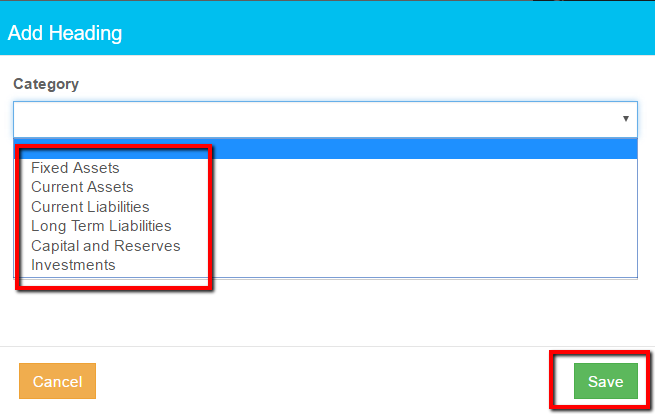
- Select a Category from the drop down list
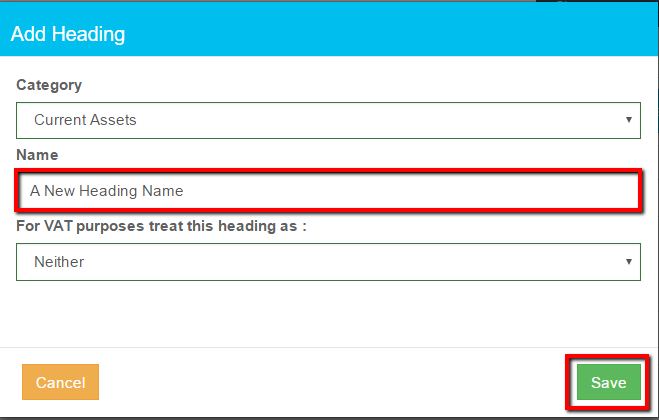
- Enter a heading in the Name box
- Indicate VAT treatment
- click Save
Related Articles
Implementing New Accounting Software
Access a full size version of this page at https://desk.zoho.eu/portal/myregdata/kb/articles/implementing-new-accounting-software The goal of any accounting system is to provide summarised transaction information that simplifies business management ...
Implementing New Accounting Software - IFAs
The goal of any accounting system is to provide summarised transaction information that simplifies business management and supports regulatory reporting. In addition to recording day to day transactions, a business needs to include it’s historic ...
How Do I Add A New Expenses Heading?
Click Settings Click Headings Select the Expenses radio button Click Add Enter the new heading name in the box and click Save. Note: Use + to quick add a heading on Create supplier invoice and Record expenses
How Do I Add A New Income Heading?
Click Settings Click Headings Select Income Click Add Heading Enter a heading in the Name box Click Save Notes: A quick add heading is available in Record income and Create invoice, initially Headings added this way appear at the bottom of the list
How Do I Add A New Customer?
Access a full size version of this page at https://desk.zoho.eu/portal/myregdata/kb/articles/how-do-i-add-a-new-customer Click Income Click My Customers Click Create Customer Enter the customer details. Notes: Fields marked * are compulsory. If the ...