How Do I Change From Recording On A Cash Basis To Accruals Basis?

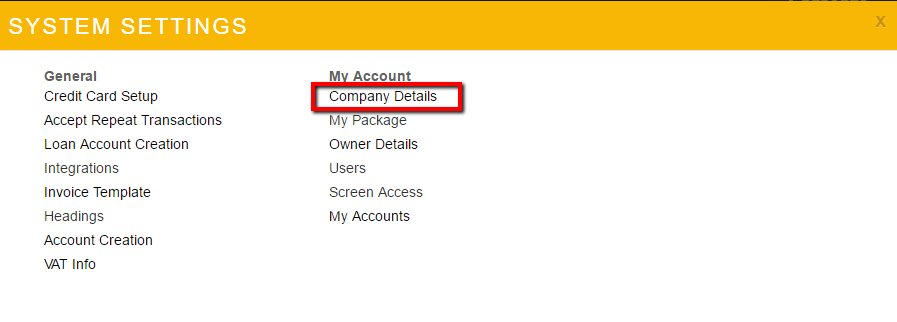
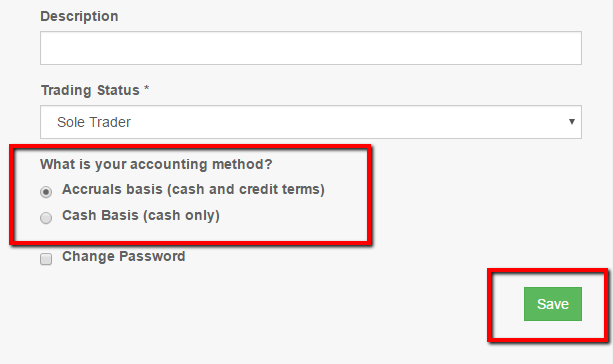
- Click the Accruals option
- Click Save
Related Articles
How Do I Change From Recording On A Cash Basis To Accruals Basis?
Click Settings Click Company Details Click the Accruals option Click Save
How Do I Record Cash Sales?
Click Income Click Record Income Choose Customer from the drop down menu. To record a general sale/income, use the default Sales. Use the + next to the Customer drop down to quick add a new customer if needed Enter the date. (OPTIONAL) Enter a unique ...
How do I change my Bank Account Name?
The names used on the Bank Accounts affect the default bank account presented when recording transactions. The default bank account will be an account named Current Account if present otherwise it's the alphabetic first bank account. Bank accounts ...
CIS Transaction Recording
Click SETTINGS/COMPANY DETAILS Set the system to Accruals Accounting CIS Subcontractors Record the total value charged to your Customer as a Sales Invoice The Customer deduction from that invoice can be recorded as Sales Credit Note Use a Current ...
How Do I Record Petty Cash Transactions?
Any income or expense transaction can be recorded using cash as the payment method by selecting it specifically from the drop down list of offered during transaction entry. Select cash as the method of payment, the system does the following ...